We helped 75+ brands generate $1.56M+ in revenue. Average ROI: 240% in Year 1
ERP. Three letters that come up constantly in conversations about business software — and that most small business owners nod along to without being entirely sure what they mean.
Enterprise Resource Planning. Even the full name doesn't help much. What does it actually do? Is it the same as a CRM? Does a small business like yours actually need it — or is it something only large corporations use?
This guide answers all of those questions No software sales pitch. No jargon. Just a clear explanation of what ERP software is, what problem it solves, how it compares to CRM, which businesses genuinely benefit from it, and what the realistic options and costs look like for a small business in 2026.
By the end, you'll know exactly whether ERP belongs in your business — and if it does, where to start.
At AheadTech360, ERP and CRM implementation is one of our most requested services — and also one of the most misunderstood. The most common thing we hear from new clients is 'I know I need something to manage my business better, but I don't know if it's an ERP, a CRM, or just better spreadsheets.' This guide gives you the framework to answer that question for your own business before you spend a dollar on any software.
ERP stands for Enterprise Resource Planning. Ignore the word 'enterprise' — it misleads most small business owners into thinking ERP is only for large corporations. Modern ERP systems are used by businesses of all sizes, including small businesses with 5–50 employees.
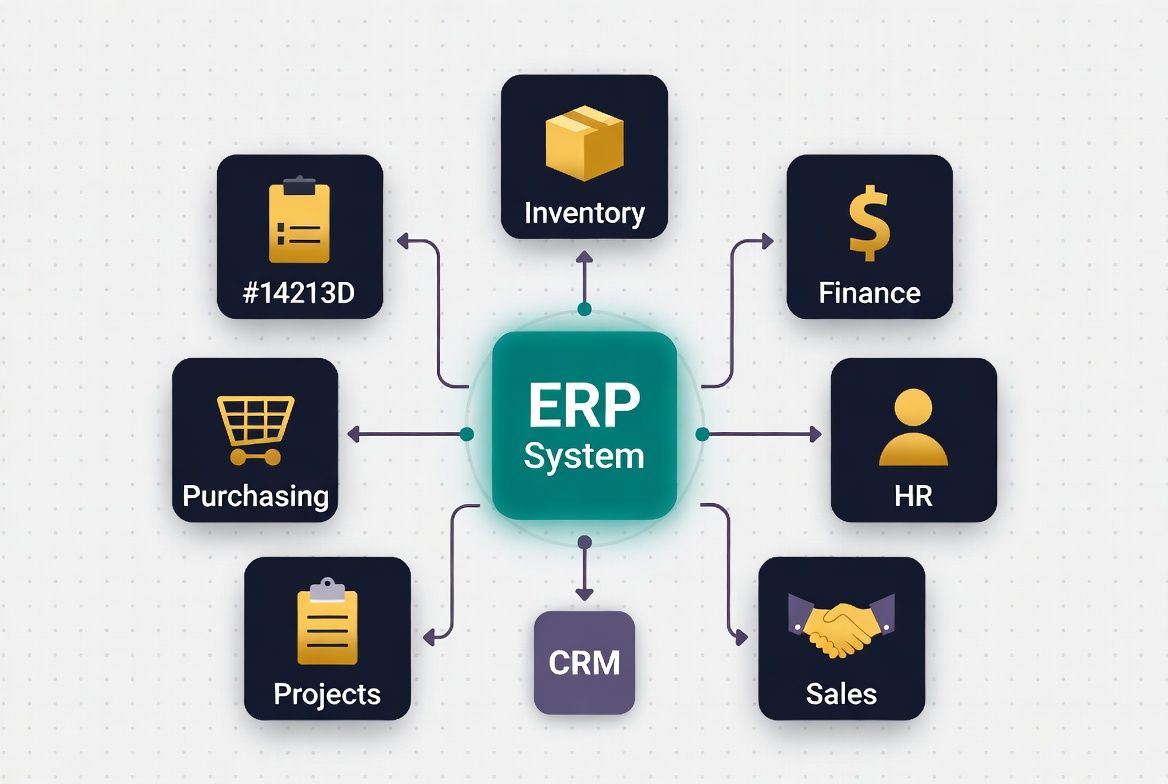
At its core, ERP software is a single system that connects all the different parts of your business — inventory, finance, purchasing, HR, sales, and operations — into one shared database. Instead of having your accounts in QuickBooks, your inventory in a spreadsheet, your orders in an email inbox, and your projects in a separate tool, ERP puts all of these in one place where they talk to each other automatically.
The classic before/after: Before ERP, a sales rep closes a deal and emails the warehouse team to check inventory availability. The warehouse checks a spreadsheet, emails back. Accounts invoices manually. The owner pulls numbers from three different systems to understand profitability. Everyone is duplicating work and making decisions with incomplete data. After ERP, the moment a deal is closed, inventory is automatically checked, a purchase order is triggered if stock is low, an invoice is generated, and the owner's dashboard updates in real time. One system. Zero duplication.
ERP software is a connected business management system that replaces multiple separate tools — spreadsheets, accounting software, inventory trackers, HR systems — with one unified platform where every department works from the same real-time data.
ERP and CRM are often confused because some platforms offer both, and the terms are sometimes used interchangeably in sales conversations. They are different tools that solve different problems — though they often work best together.
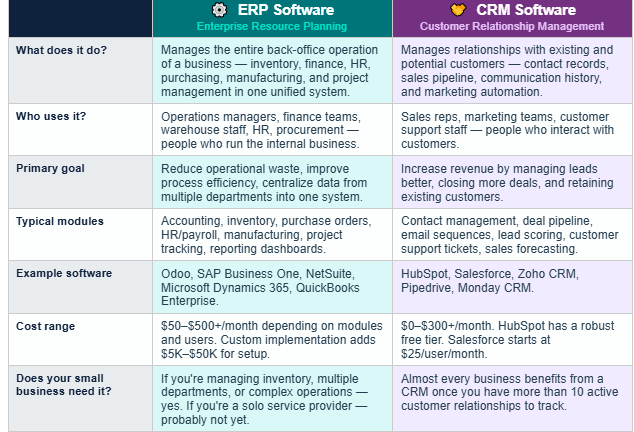
The simplest way to remember the difference: CRM faces outward — it manages your relationships with customers. ERP faces inward — it manages the operations that run your business. A growing business typically needs both. A very early-stage business might start with just a CRM and add ERP modules as operations become more complex.
Many small businesses come to AheadTech360 asking for a CRM when what they actually need is a combination of CRM and basic ERP modules. The clearest signal: if you're losing track of customer communications, you need a CRM. If you're also losing track of your inventory, your costs, or your project profitability — you need ERP functionality too. Platforms like HubSpot and Odoo offer both, which is why they're popular choices for growing small businesses.
ERP software is modular — you don't have to implement every module at once. Most small businesses start with 2–3 modules that address their biggest operational pain points and add more as they grow. Here are the most common ERP modules and what they do in practice:
Tracks stock levels, locations, and movements in real time. Triggers purchase orders when stock falls below minimum levels. Example: A cleaning supply business knows exactly how many units of each product are in stock across two warehouses — and gets an automatic alert when any item hits the reorder threshold.
Handles accounts payable, accounts receivable, general ledger, bank reconciliation, and financial reporting — all connected to the rest of the business. Example: When a purchase order is received, the invoice is automatically matched and queued for payment. Month-end close takes hours instead of days because all data is already in one system.
Manages the entire purchasing process — from creating a purchase request through vendor approval, PO creation, delivery confirmation, and invoice matching. Example: A restaurant supply company eliminates manual email chains with suppliers. Every PO is tracked from creation to delivery with full audit trail and automatic 3-way matching.
Tracks employee records, time and attendance, leave management, payroll processing, and compliance documentation in one place. Example: A service business with 15 field technicians uses HR module to track hours worked, calculate payroll automatically, and maintain compliance documentation without a separate HR system.
Tracks project budgets, timelines, resources, and profitability — connected to billing and accounting so you always know if a project is on budget. Example: A web development agency tracks time spent on each client project, compares it against the quoted hours, and automatically generates invoices when milestones are completed.
Pulls data from all modules into unified dashboards and reports — so you can see the full picture of your business performance in real time without exporting spreadsheets. Example: A business owner opens one dashboard every Monday morning to see: revenue this week, outstanding invoices, inventory value, top-selling products, and payroll costs — all updated in real time.
Not every business needs a full ERP system — and implementing one before you're ready is a waste of time and money. Use this checklist to identify the signals that suggest your business is ready for ERP, CRM, or both:
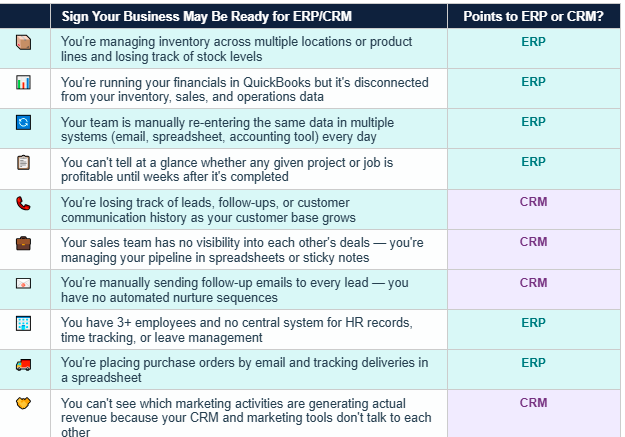
If you ticked 3 or more items, your business is likely past the point where manual processes and disconnected tools are the right solution. The question is not whether to implement a system — it's which system, how much of it, and in what order.
The most expensive ERP mistake small businesses make is implementing too much too fast. A full ERP rollout covering all modules simultaneously is complex, disruptive, and expensive — and it's the reason ERP has a reputation for failing. The successful approach is phased implementation: start with 2–3 modules that solve your most painful problems, get the team comfortable with the system, then add modules over 6–12 months. AheadTech360 always recommends phased rollouts for small businesses.
Here are three platforms that consistently perform well for small businesses at different stages and with different needs:
The most complete open-source ERP for growing small businesses
💰 Cost: Free Community edition available. Odoo Online starts at ~$24/user/month per app. Full suite implementation by a partner typically costs $5,000–$25,000.
🎯 Best For: Small to mid-size businesses needing full ERP (inventory, accounting, HR, projects, manufacturing) plus CRM in one platform. Ideal for product-based businesses, manufacturing, and multi-department operations.
🔧 Key Modules: Inventory, Accounting, Purchase, Sales, CRM, HR, Projects, Manufacturing, Website, POS
✅ Strengths: Most complete feature set for the price. Open-source flexibility. Modules integrate natively — no third-party connectors needed.
⚠️ Watch out: Steeper learning curve than SaaS-only tools. Implementation complexity scales with the number of modules. Requires experienced implementation partner for best results.
The most accessible CRM — with ERP-lite capabilities as you scale
💰 Cost: Free CRM tier available (very capable). Starter Hub from $20/month. Professional from $890/month. Enterprise from $3,600/month.
🎯 Best For: Service businesses, agencies, B2B companies, and any business that needs strong CRM and marketing automation first — with the option to add operations and finance tools as they grow.
🔧 Key Modules: CRM, Sales Pipeline, Marketing Automation, Email Sequences, Customer Support (Service Hub), Operations Hub, Content Management
✅ Strengths: Best-in-class CRM and marketing automation. Free tier is genuinely useful. Excellent onboarding resources and support. Easy to get started without implementation partner.
⚠️ Watch out: Not a true ERP — no native inventory or manufacturing modules. Gets expensive at Professional and Enterprise tiers. Deep ERP needs require integrations with other tools.
Enterprise-grade ERP built for businesses ready to scale significantly
💰 Cost: Starting at ~$999/month base + $99/user/month. Annual contract required. Implementation costs typically $15,000–$80,000+.
🎯 Best For: Businesses with $1M+ revenue, complex multi-entity operations, or those needing enterprise-grade financial management, compliance, and reporting. More suited to mid-market than early-stage small businesses.
🔧 Key Modules: Financial Management, Inventory, Order Management, CRM, HR, Professional Services Automation, Multi-currency, Multi-subsidiary
✅ Strengths: Best-in-class financial reporting and compliance. Handles multi-entity and international operations. Scales to very large organizations without platform changes.
⚠️ Watch out: Significant investment — pricing and implementation cost is prohibitive for most early-stage small businesses. Annual contract with significant lock-in. Complex implementation.
ERP software is not a tool for large corporations. It's a solution for any business that has outgrown disconnected spreadsheets and separate tools — and is losing time, money, or visibility because its systems don't talk to each other.
The question is not whether ERP is relevant to your business. The question is which modules matter most for your specific operation right now, which platform fits your budget and growth trajectory, and how to implement it in a way that doesn't disrupt your business while it's being set up.
The right ERP or CRM system doesn't just organize your data — it gives you visibility into your business that lets you make faster, smarter decisions. And for a growing small business, that visibility is one of the most valuable assets you can invest in.